
EAC is licensed per edition and billing cycle:
| Edition | Scope | Typical use case | Billing cycles |
|---|---|---|---|
| Single-Server | One EAC server instance | Simple/standard deployments on a single host | Monthly or Annual |
| Multi-Server | Multiple EAC server instances in the same cluster/environment | High availability, scale-out, or multi-node orchestration | Monthly or Annual |
Note: “Server” refers to one running EAC application instance. If you deploy multiple nodes (e.g., behind a load balancer), you need a Multi-Server license.
Entering a license in the UI
- Sign in with an Admin account.
- Go to Admin → Settings → License (menu label may be System → License depending on version).
- Choose one of:
- Paste license key: paste the full text.
- Enter the company name attached to the license
- Enter the license type code
- finally select the license server mode (MONO, MULTI)
- Click Validate & Save.
- Confirm the beginning date and the expiration date.
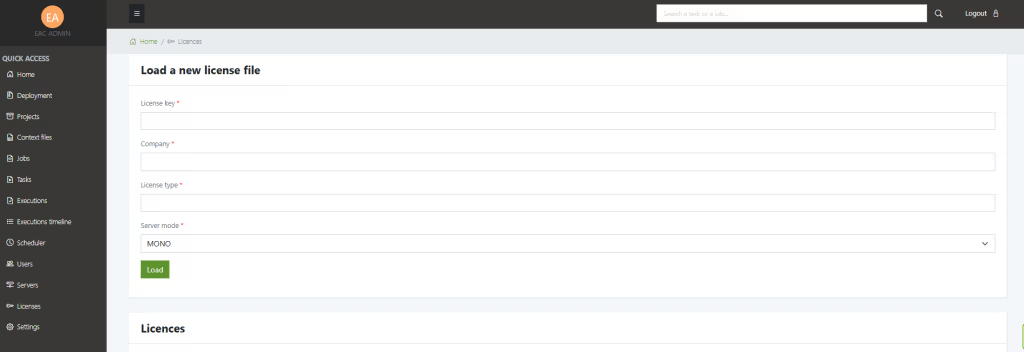
If validation fails, contact us.
Renewals and switching plans
- Monthly → Annual (or reverse): enter the new license key the same way and Validate & Save. The UI will update the edition/cycle immediately.
- Single-Server → Multi-Server: apply the new key, then restart additional nodes as needed.
- Expired license: apply the renewed key; the status will switch back to Valid once saved.
Troubleshooting
| Symptom / Message | What it means | How to fix |
|---|---|---|
| Invalid signature | The key was altered or pasted incompletely | Re-copy the full key. Avoid extra spaces or line breaks |
| Edition mismatch | You’re using a Single-Server key on a multi-node deployment | Apply a Multi-Server license or reduce to one running node |
| License expired | End date reached | Renew your license and apply the new key |
| Wrong product / version | Key not issued for this product or major version | Request a correct key from support |
| Cannot contact license service (if your build checks online) | Network/proxy blocks validation | Allow outbound access or request an offline license key |
Tips
- If you use copy/paste, ensure there are no hidden characters (paste into a plain-text editor first).
- For file upload, verify the file name and extension are unchanged.


