
A task can be scheduled with 2 methods:
- directly into EAC
- on the system crontab
Schedule the task in EAC
With the internal scheduler you will be able to execute a task whenever you want and also under the minute (each second if you want).
Go into the task where you want to add a scheduler and click on “Cron planification” tab:

Click on [Add scheduler] button.
Keep the default task type option to “exec”:
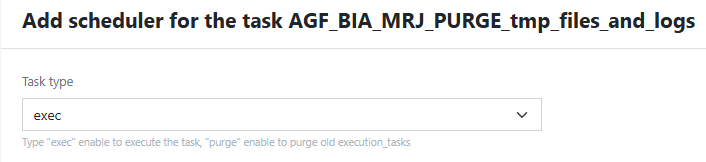
Select the first execution date and time and if you want when it must be stopped. Don’t forget to enable the scheduler.

Specify the frequency:
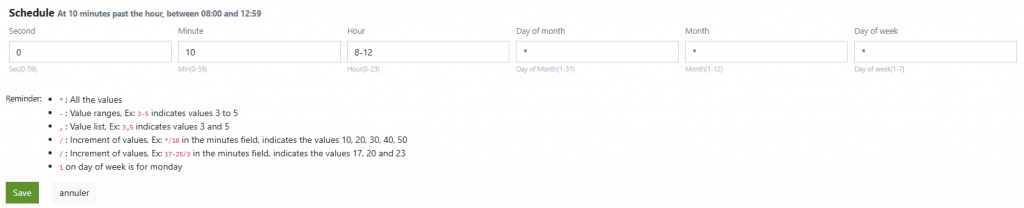
Schedule the task in the crontab
With this method, the execution of the task is only possible in minimum at the minute. Use the internal scheduler to execute your task under the minute.
Open the crontab of the eac user with the following command line:
crontab -e
In EAC, go in the task > Additionnal informations tab and copy the first command line of the table identify by the “Execution command line (for your scheduler) “. Example:
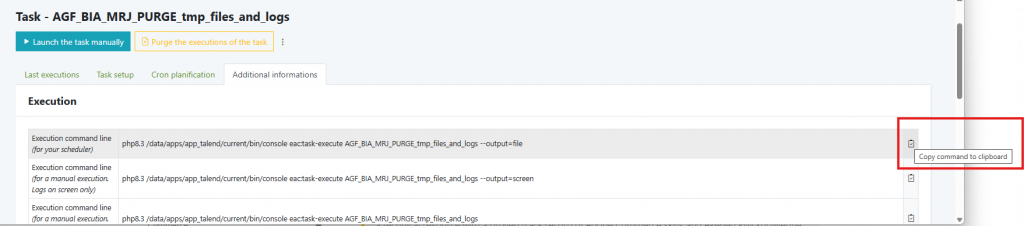
Past this command line in the cron editor and define the frequency of the execution. You can use this online cron editor to help you: https://crontab.guru/weekdays-only.


