
Every time a task/ETL runs, EAC stores an execution record and (optionally) logs. Over time, this history grows and can impact UI responsiveness and database size.
Purges let you clean old executions and their logs based on clear rules.
Purging removes executions of the selected task and their attached logs (according to your log backend). It does not delete the “purge” executions themselves.
Why purge?
- Keeps the database small and fast (queries, dashboards, filters).
- Reduces disk usage (when log type =
file). see settings( scheduling & system > task logs type) - Improves backup/restore times.
- Enforces data retention policies.
Manual purge (per task)
From a task page:
- Open Tasks → {Your task}.
- Click Purge the executions of the task.
- In the dialog, pick a Purge mode and fill its parameter(s).
- Click Launch the purge.
Screenshots (placeholders):

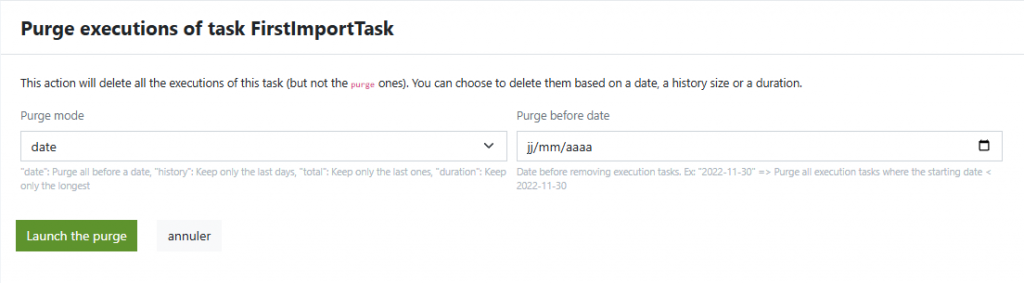
the date picker input format depends on your web browser
Purge modes
- date — Purge all before a date
Parameter: Purge before date (YYYY-MM-DD).
Example: delete everything started before 2025-06-01. - history — Keep only the last N days
Parameter: Days to keep (integer).
Example: keep 30 days of history; remove older ones. - total — Keep only the last N executions
Parameter: Executions to keep (integer).
Example: keep 200 most recent runs; remove the rest. - duration — Keep only the longest N
Parameter: Executions to keep (integer).
Example: keep 10 longest runs (useful for performance analysis).
The UI asks for the appropriate numeric value or date depending on the selected mode.
Scheduled purge (recommended)
Automate cleanup with the built-in scheduler.
- Open Tasks → {Your task} → Cron planification.
- Click Add scheduler.
- Task type: Purge past executions.
- Purge mode: choose one of date / history / total / duration.
- Set Begin at / Finish at if needed.
- Define the Cron (second, minute, hour, day, month, day-of-week).
- Check Schedule active → Save.
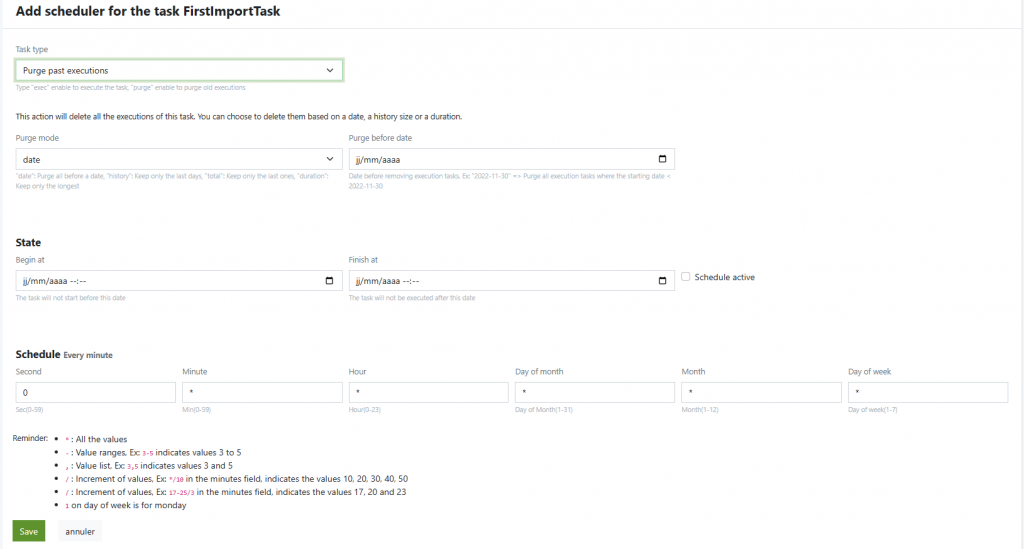
Example schedules
- Nightly, keep last 30 days
- Mode:
history= 30 - Cron:
0 0 * * *(every day at 00:00)
- Mode:
- Weekly, keep last 500 executions
- Mode:
total= 500 - Cron:
0 0 * * 0(Sundays at 00:00)
- Mode:
- Monthly, keep the 20 longest (capacity planning)
- Mode:
duration= 20 - Cron:
0 3 1 * *(1st of month at 03:00)
- Mode:
Choosing a retention strategy
Use one or combine several purge schedules:
- Production (typical):
- Keep 30–90 days with
history, nightly. - Additionally keep last 200–1000 runs with
totalto preserve dense recent activity.
- Keep 30–90 days with
- Non-prod (dev/test):
- Keep 7–14 days with
history, nightly. - Or last 100–300 runs with
total.
- Keep 7–14 days with
- Performance analysis windows:
- Monthly
durationkeeping 10–50 longest executions.
- Monthly
How to size retention
- Estimate daily runs per task × average row size in log tables.
- Ensure DB growth stays well below disk thresholds (e.g., <70% usage).
- Prefer shorter history with richer metrics over unbounded growth.
Operational notes
- Multi-server: Purges operate at the data layer; results are visible on all nodes.
- Log backend: If
file, purges remove the task’s related files in your log path; ensure the service user has rights to delete. - Safety: Start with conservative settings, verify results, then tighten retention.
Related
- Acknowledgement (Ack): manage failed runs before relaunch.
- Monitoring: watch error rates and capacity trends to adjust retention.
- Settings → Task logs type: choose
filevsdbaccording to your ops policies.


